
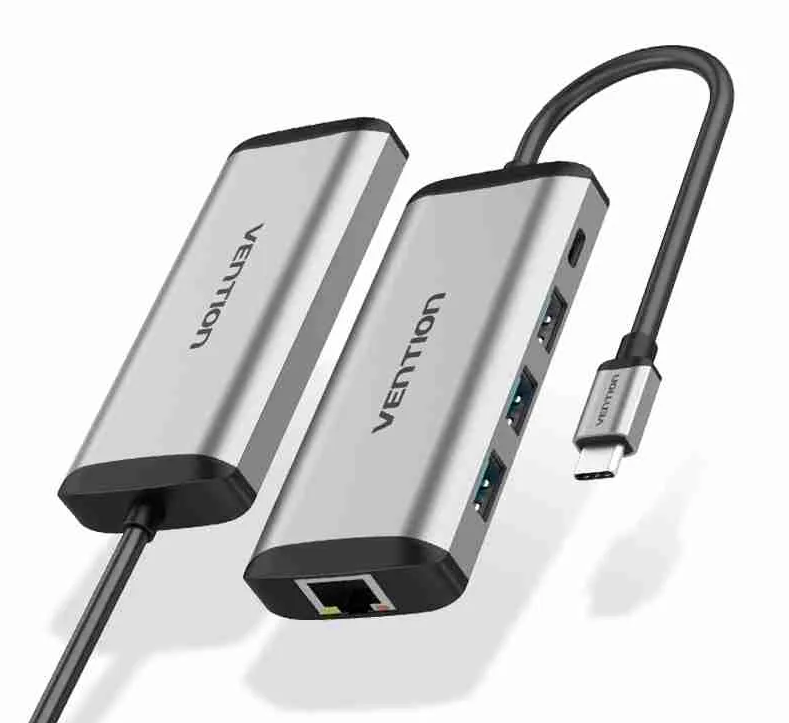
Vention USB-C MULTI-FUNCTIONAL 5 in 1 DOCKING STATION Type C to USB 3.0(3 ports), Gigabit Ethernet, PD Docking Station
Vention USB-C Multi-Functional 5 in 1 Docking Station – VEN TGDHB
- Connection Type: USB-C
- Data Transfer Rate: Up to 5 Gbps for USB 3.0 ports, and up to 480 Mbps for USB 2.0 ports
- Video Resolution: Up to 4K @30Hz or 60Hz (depending on the model) for HDMI
- Power Delivery: Supports pass-through charging with USB-C PD (Power Delivery), often up to 60W or 100W
- Compatibility: Works with USB-C enabled devices supporting DisplayPort alt mode and USB Power Delivery
- Material/Build: Often made with a combination of high-quality plastics and metals for durability
- Plug and Play: Typically, no drivers required for operation
KSh 5,000.00 plus 16% VAT
Vention USB-C Multi-Functional 5 in 1 Docking Station – VEN TGDHB
The Vention USB-C Multi-Functional 5 in 1 Docking Station (Model: VEN TGDHB) is a versatile accessory that expands the functionality of your USB-C device, such as a laptop or tablet, by providing additional ports. While I don’t have real-time, model-specific data as of my last training cut-off in September 2021, I can provide information based on typical features found in 5-in-1 USB-C docking stations. Please check the latest details from the manufacturer or your retailer.
A 5-in-1 docking station typically includes:
- USB-C Port: For connecting and charging compatible USB-C devices, or transferring data.
- USB-A Ports: Usually, there are multiple USB-A ports for connecting a variety of devices such as a mouse, keyboard, or USB flash drive.
- HDMI Port: For connecting an external monitor. These ports often support 4K resolution, allowing you to extend or mirror your display.
- Ethernet Port: Some models may include a Gigabit Ethernet port for wired network connections.
- SD/MicroSD Card Slots: For reading data from SD or MicroSD cards, common in cameras and some other portable devices.
The docking station connects to your device via a USB-C connector. It’s usually plug-and-play, meaning it doesn’t require additional drivers or software to work. However, the exact functionality can depend on the specific capabilities of your device’s USB-C port (not all USB-C ports support video output, for example).


There are no reviews yet.